How to Play Build a Country
Plot, build, population, sell, expand, then ally or war until one country takes the five-player server.
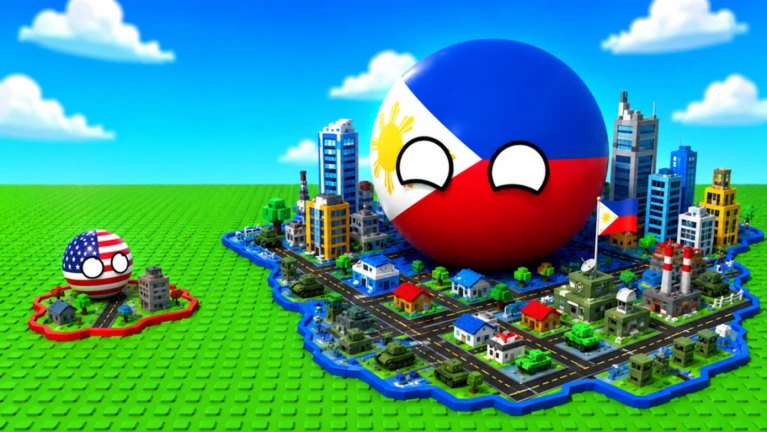
Build a Country is not a sandbox you decorate until you get bored. It is a five-player strategy and tower-defense loop that ends when one country takes the server. The official pitch is short on purpose: start with a tiny town, grow it into a city of the future, expand, then ally or declare war. This page is that loop in order. Getting Started is the first hour. This is every hour after.
If cash is the part that keeps breaking, jump to How to Make Money. If the HUD is the part that keeps breaking, jump to Controls. If the neighbors are the part that keeps breaking, jump to How to War. Rankings and seats live on the Tier List Hub and the Players Hub.
The loop at a glance
- Claim a plot on a five-player server.
- Build housing, production, and only later a military layer.
- Grow population so the town is more than a skyline.
- Sell cash on a rhythm so builders never starve.
- Expand the country toward that city-of-the-future look.
- Ally or war with the other four players.
- Take the server, or get taken.
Skip a step and the next one pretends to work. A pretty military pad with no people is a bill. A huge population you never sell is a museum. An alliance with no cash is a promise you cannot keep.
Plot
You are not painting a continent. You are running one plot in a lobby of five. The plot holds the town, the storage box, the builders, and the flag the neighbors can already see. Walk the edges once at spawn. Notice where builders will path and where a later tank or plane would block a farm belt. Placement mistakes are expensive because builders have to walk them off the map later.
Change Size exists as a gamepass because scale is part of the fantasy and part of the clutter problem. Bigger is not free. Bigger that you cannot fill is just a louder empty plot.
Build
Queue work the builders can finish. Housing and farms belong on the first pass. Military silhouettes belong after selling cash is a habit. The Buildings Guide splits those jobs without inventing a gold menu. Your job on this page is simpler: never let the queue go idle while you still have cash and box space.
The build HUD is on-screen. Learn its labels in the live session. Standard Roblox movement still applies: WASD or left stick to walk, right-drag to orbit, tap or click to select, pinch to zoom on a phone. Do not hunt for a secret Build a Country hotkey. There is not a wiki-invented one.
Population
People are how a tiny town becomes a country instead of a diorama. Housing is the tap. Production keeps those people useful. The 2x Population pass doubles a number that already exists; it does not summon a city on grass. If the crowd is not growing, stop placing tanks and read the housing section of the buildings guide.
Population is also the quiet score the neighbors can estimate. A packed town that sells cash is a country that can restock. An empty plaza with a plane on the lawn is a country that cannot.
Sell
Cash is not a mystery resource that appears because the skyline looks expensive. You sell. Selling is the tap that pays builders, restocks military, and funds expansion. 2x Money doubles that sell. Codes such as 5MVISITS (listed GONE SOON) are a bump, not a second tap. The full argument sits on How to Make Money. The short version for this loop: if you are not selling, you are not playing the middle of the game.
Expand
Expansion is how the tiny town starts to look like the city on the thumbnail. It is also how players go broke. Expand housing and production first. Expand military only when the bank can replace what a fight will delete. VIP does not change that order. Infinite Storage helps when the box, not your ambition, is the choke.
Look at the other four plots while you expand. If two neighbors already share a border language, your expansion is happening on a board that may already have a bloc. The Players Hub is where those seats get named.
Ally or war
This is still a war game. Official art shows tanks and planes because the military layer is real. It is not a unit stat sheet, and this wiki will not invent one. War is a step you take when the rest of the loop can pay for losses. Allies are a step you take when five people in a server would rather not all shoot at once.
How to War covers timing, restock, and the politics of four neighbors. The Tier List Hub is the place to argue what is worth the Robux. This page only insists on order: do not declare because you are bored of waiting on builders.
Take the server
The win condition is official and public. Expand, choose allies or war, take the server. Taking it requires a town that still prints after the fight. A last tank with no cash behind it is a concession speech with extra steps. If you cannot describe which loop step you are on, you are decorating. If you can name the step and the stall, you are playing.
Where the loop usually breaks
- Plot: you never looked at the box or the neighbor flags.
- Build: you queued a skyline builders cannot finish.
- Population: you treated people as scenery.
- Sell: you assumed cash would appear from military pads.
- Expand: you grew the empty parts.
- Ally or war: you pressed the loud button first.
- Takeover: you arrived broke.
Fix the earliest break, not the loudest one. A war problem that is actually a sell problem will not be solved by another plane.
The flywheel test
At any minute you should be able to point at the plot and say which ring of the loop is spinning. Builders walking means build is alive. Crowds thickening means population is alive. Counters rising means sell is alive. New pads going down on purpose means expand is alive. Flags moving means politics are alive. If none of those are true and you are orbiting your own tanks, the flywheel has already stopped and the other four players can hear it.
Play the loop in order. Visit Getting Started when the first hour is messy, and come back here when you need the whole machine in one view.
Frequently Asked Questions
Quick answers for codes, war, and growing your country.
What is the core loop in Build a Country?
Claim a plot, build, grow population, sell cash, expand, then ally or war until someone takes the five-player server. Getting Started is the first hour of that loop.
Can I skip population and rush tanks?
You can place them. You will not restock them. Empty military plots starve cash. Read How to Make Money and the Buildings Guide before you convert the town into a pad.
How do I take the server?
By still having a working sell loop after fights. Allies and wars decide the last step, which is why How to War and the Players Hub sit next to this page.
Are alliances part of how you play, or optional flavor?
They are part of the official loop. Five players means four neighbors. Ignoring them is a strategy only until two of them stop ignoring each other.
Where do controls fit in the loop?
They are how you select, orbit, and read the on-screen build HUD. Use Controls if the camera is the stall, then return to the loop. This wiki does not invent unique keybinds.